Batch PDF Printer
Print many PDFs in one go, in order.
Explore Batch PDF PrinterMini Utilities Professional PainkillersOne thing. Done well.
Small Windows tools
Count pages, print a stack of PDFs or collect form data with a Windows tool built for the job. Each tool runs on your PC and is available as a one-time purchase.
TaskFANG — One thing. Done well.
Choose the tool for the task. Each has a focused interface and its own step-by-step guide.
A small one-time price. No subscription. The license is personal and for the purchaser's use only: please do not pass copies on to others. The other license and upgrade terms will be published before launch.
TaskFANG never uploads your files. The tools work on your computer, without ads or tracking.
Built for repeat jobs in offices, print shops and archives, from counting pages across folders to reviewing a batch before export.
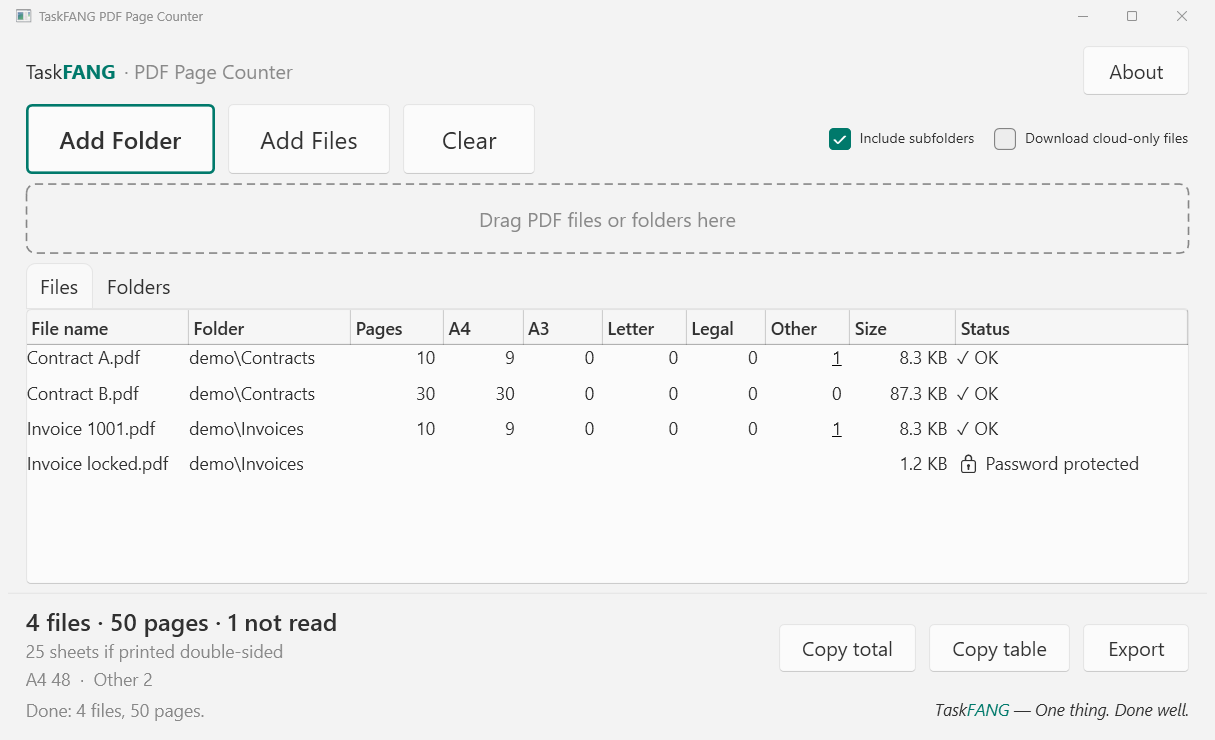
Choose a folder to see PDF page counts per file, per folder and for the entire batch. Check paper sizes, estimate sheets for double-sided printing and export to Excel or CSV.
Pricing will be announced before launch.
A Windows app, for Windows 11 PCs. Not for phones or Mac.
Print many PDFs in one go, in order.
Explore Batch PDF PrinterCollect the values of many filled-in PDF forms into one Excel workbook.
Explore PDF Form Data CollectorSplit one PDF of many people, such as payslips, into a file per person.
Explore PDF Split by NameCount the words in many Word documents at once and export the results to Excel.
Explore Batch Word CounterSearch by clues such as a file name, type or approximate date. Review the matches and copy selected files to one folder.
Explore File FinderFind PDFs, Word and Excel files, photos and other attachments in your Outlook mail file and copy them to a folder.
Explore PST Attachment ExtractorMore tools are on the way. Each one will get its own page and step-by-step guide here.
TaskFANG tools are sold only through the Microsoft Store on your Windows PC. This website does not sell anything.
Payment, installation and updates are done by the Store, safely and in your own currency.
Every tool has a simple guide on this site, plus help if something does not work as expected.